What Is M4B? How to Open, Play and Convert an M4B File
What is M4B? An M4B file is a whole audiobook in one file: AAC audio, chapters, a cover and a saved place. How it differs from MP3, how to play and convert it.
VoiceBookify10 min read
On this page
What is M4B? An M4B file is a whole audiobook in a single file: AAC audio in an MPEG-4 container, with a chapter list, the cover, the book's details and a mark that tells players it is a book, so they remember where you stopped. MP3 audiobooks usually come as a folder of files, one per chapter; an M4B is the same book bound into one.
We build an M4B converter, so we opened one up instead of repeating what other guides say. Below is what's inside a real M4B, how it compares with MP3 and M4A, how to play one on each kind of device, and how to convert it either way.
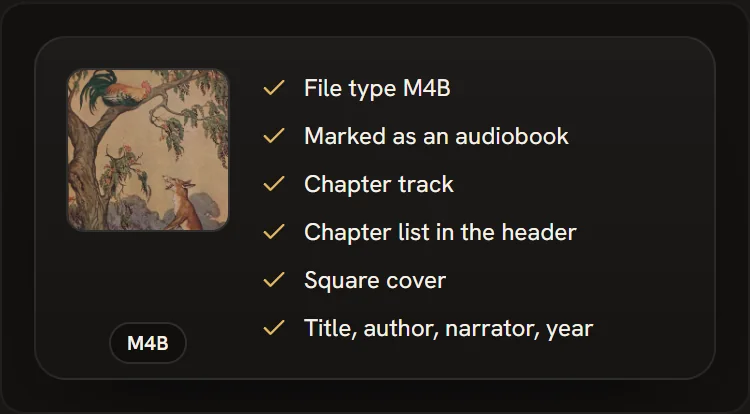 Everything an M4B carries besides the audio, from our MP3 to M4B converter
M4B at a glance
| M4B | |
|---|---|
| What it is | An audiobook in one file |
| Container | MPEG-4 (the same as MP4 and M4A) |
| Audio | AAC, usually 64 to 128 kbps |
| Chapters | Yes, with names and times |
| Cover and details | Yes: title, author, narrator, year, cover picture |
| Saved place | Players keep where you stopped |
| Encrypted | Not by itself. Store-bought audiobooks often use other, protected formats |
What's inside an M4B file
To see what an M4B really holds, we took the sample book our converter makes from three public domain fables recorded for LibriVox (12 minutes 5 seconds, three chapters, 9,268,151 bytes) and read it piece by piece. An MPEG-4 file is a series of labelled boxes, and this one has three at the top:
| Part | Size | What it holds |
|---|---|---|
File type (ftyp) |
32 bytes | The brand M4B , which says "audiobook" before a player reads anything else |
Audio (mdat) |
8,995,816 bytes, 97% | The AAC audio itself: 44.1 kHz mono, about 99 kbps |
Index and details (moov) |
272,303 bytes, 3% | Where each moment of audio is in the file, the chapters, the tags and the cover |
Inside the index are the parts that make it a book rather than a long song:
- Chapters, written twice. A chapter track (a small text track the audio points to with a
chapreference, as Apple's QuickTime documentation describes; the form Apple's players read) and a chapter list in the file's header (379 bytes here, the form many Android players and Audiobookshelf read). Our converter writes both, with the same names and times. - An audiobook mark. A tag that sets the media type to audiobook, so a player shelves the file with your books and keeps your place.
- The cover, 145,459 bytes of the 272,303: a 682 by 682 picture.
- The details: title, album, author, album artist, narrator (in the composer tag, as Apple's apps place it), year and genre.
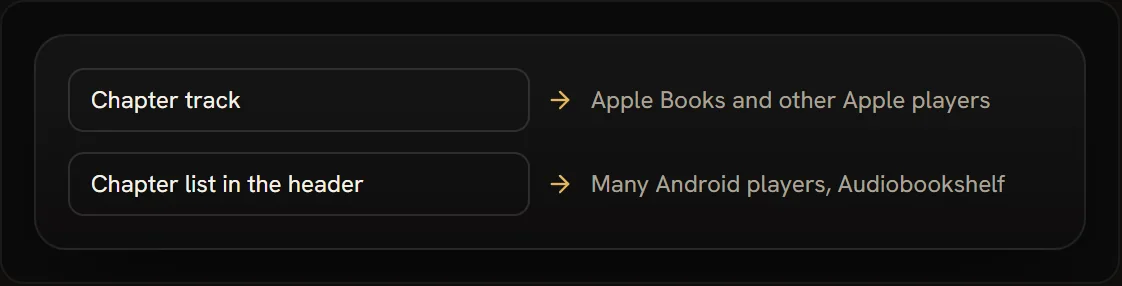 The two places players look for chapters; a well-made M4B has both
M4B vs MP3
The main difference is shape, not sound. An MP3 audiobook is many files that a player treats as separate songs; an M4B is one file a player treats as one book.
| M4B | MP3 | |
|---|---|---|
| Files per book | One | Usually one per chapter |
| Audio | AAC | MP3 |
| Chapters | Inside the file, with names | One file per chapter, or none |
| Saved place | Kept by audiobook players | Depends on the player |
| Cover and details | In the file | In each file's tags |
| Plays on | Phones, computers, audiobook apps | Almost everything, car stereos and old players included |
File size depends on the bitrate, not the format. We encoded the same 12 minute 5 second recording both ways: the three MP3s from LibriVox at 64 kbps came to 6,004,736 bytes, and an M4B at a nominal 64 kbps came to 6,305,809 bytes. An hour of speech at 64 kbps is about 29 MB either way.
Quality. Fraunhofer IIS, the institute behind MP3, says the AAC family gives higher audio quality at much lower bitrates than MP3, and a paper it hosts by Karlheinz Brandenburg puts AAC at the same quality as MP3 at about 70% of the bitrate.
So an M4B can sound as good as an MP3 at a lower bitrate. Converting can't add quality an MP3 never had, though: converting a 64 kbps MP3 to M4B at 64 kbps or more keeps what is there.
Which to use. Choose M4B for listening in an audiobook app, on a phone or a home audiobook server, where chapters and a saved place matter. Choose MP3 for car stereos, simple MP3 players, USB sticks and anything that plays only MP3.
M4B vs M4A
M4A and M4B are the same container with the same AAC audio. The difference is the extension and, in a proper M4B, the audiobook mark: M4A is how music and other audio are usually saved, M4B is for books. An M4A can carry chapters too, but music files rarely do.
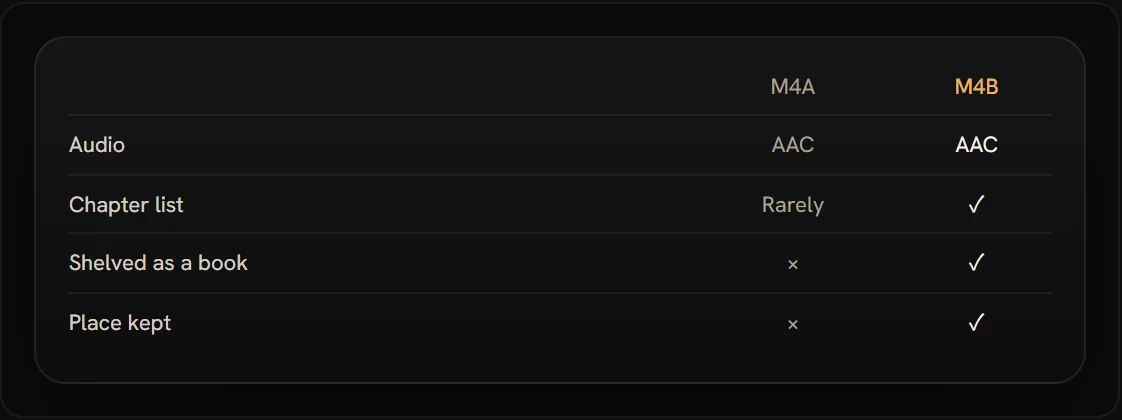 M4A and M4B: one container, two jobs
Renaming a single .m4a to .m4b is often enough for a player to treat it as a book, since nothing inside needs to change. It doesn't add chapters or the audiobook mark, though. For a book that is several M4A files, or one that should have chapters, convert it instead.
How to open and play an M4B file
Few official pages name M4B; most list M4A, which is the same format under another extension. Here is what each platform documents, checked on 13 November 2026, and the way that works.
| Device | Built in | The easy way |
|---|---|---|
| iPhone and iPad | Apple Books | Sync the file from a Mac, or use an audiobook player app |
| Mac | Apple Books | File > Import in Books |
| Windows | Media Player plays M4A | VLC, or a copy renamed to .m4a |
| Android | No audiobook player | An audiobook player app, or VLC |
| Chromebook | Plays M4A | A copy renamed to .m4a, or a web player |
| Car stereo, MP3 player | Rarely | Convert to MP3 |
iPhone and iPad
Apple Books plays audiobooks with their chapters. To put an M4B you own into it, import it into Books on a Mac first, then connect the iPhone or iPad and sync it in Finder: Apple's guide for syncing with a Mac lists audiobooks among what can be synced, under the Audiobooks tab.
On Windows, Apple says to manage audiobooks in iTunes. Apple doesn't document opening an M4B from the Files app into Books, so if you don't use a computer, an audiobook player app from the App Store is the simpler route.
Mac
In Books on a Mac, choose File > Import and pick the file, or drag it into your library, as Apple describes. It appears under Library > Audiobooks. Apple's page names MP3 and Audible audiobooks rather than M4B; if a file won't import, VLC plays it on a Mac too.
Windows
Microsoft lists AAC and M4A among the formats Media Player plays out of the box, but not M4B.
Two ways that work: open the file in VLC, which shows its chapters, or make a copy and rename it from .m4b to .m4a, which players that know M4A will open (without the chapter list). iTunes for Windows can also file it as an audiobook (set its Media Kind to Audiobook), and then remembers your place.
Android
Android itself plays AAC in .m4a files, according to Google's list of supported media formats, which doesn't mention M4B. Google Play Books only accepts uploaded PDF and EPUB files, not audiobooks. Install an audiobook player app from Google Play, which keeps your place and lists chapters, or VLC for Android.
Chromebook
Google's list of file types a Chromebook opens includes .m4a but not .m4b. Rename a copy to .m4a, or play it in the browser: our M4B to MP3 converter lists the chapters of an M4B you drop in and plays any of them in the page, without uploading the file.
VLC on any computer or phone
VLC plays MPEG-4 files with AAC audio, and VideoLAN's own notes say MPEG-4 files holding an audiobook have the .m4b extension. When the file has chapters, Playback > Chapter lists them.
Audiobookshelf and other home servers
Audiobookshelf supports M4B, can merge a book's files into one M4B and has a chapter editor. Its own FAQ notes that M4B is convenient as one file per book, but that MP3 is supported more widely, and that some M4B files use an AAC variant (xHE-AAC) that older versions of FFmpeg can't decode.
Car stereos and MP3 players
Many car stereos, USB sticks and simple MP3 players don't play M4B at all. Convert the book to MP3, one file per chapter, as below.
Where M4B files come from
- LibriVox. The free public domain library says M4B is available for most of its books, with a link on each book's catalog page.
- Your own recordings and files. Join MP3 chapters into one M4B, or have an AI narrator read a book you have as text (both below).
- Audiobook CDs. Rip the discs to MP3 or FLAC, then join the tracks into one M4B.
- Not Audible downloads. Audible's own files are AAX, which Audible calls the Audible Enhanced Audiobook format. They aren't M4B and are made for Audible's apps; our tools don't open them.
How to convert an M4B file
M4B to MP3. Drop the M4B into our M4B to MP3 converter. It reads the chapters and gives you one MP3 per chapter, named after it and numbered so they play in order, with the title, author and cover in every file. It can also make the whole book one MP3 with chapter marks, or parts of a set length for a car stereo. Nothing is uploaded: the conversion runs in your browser.
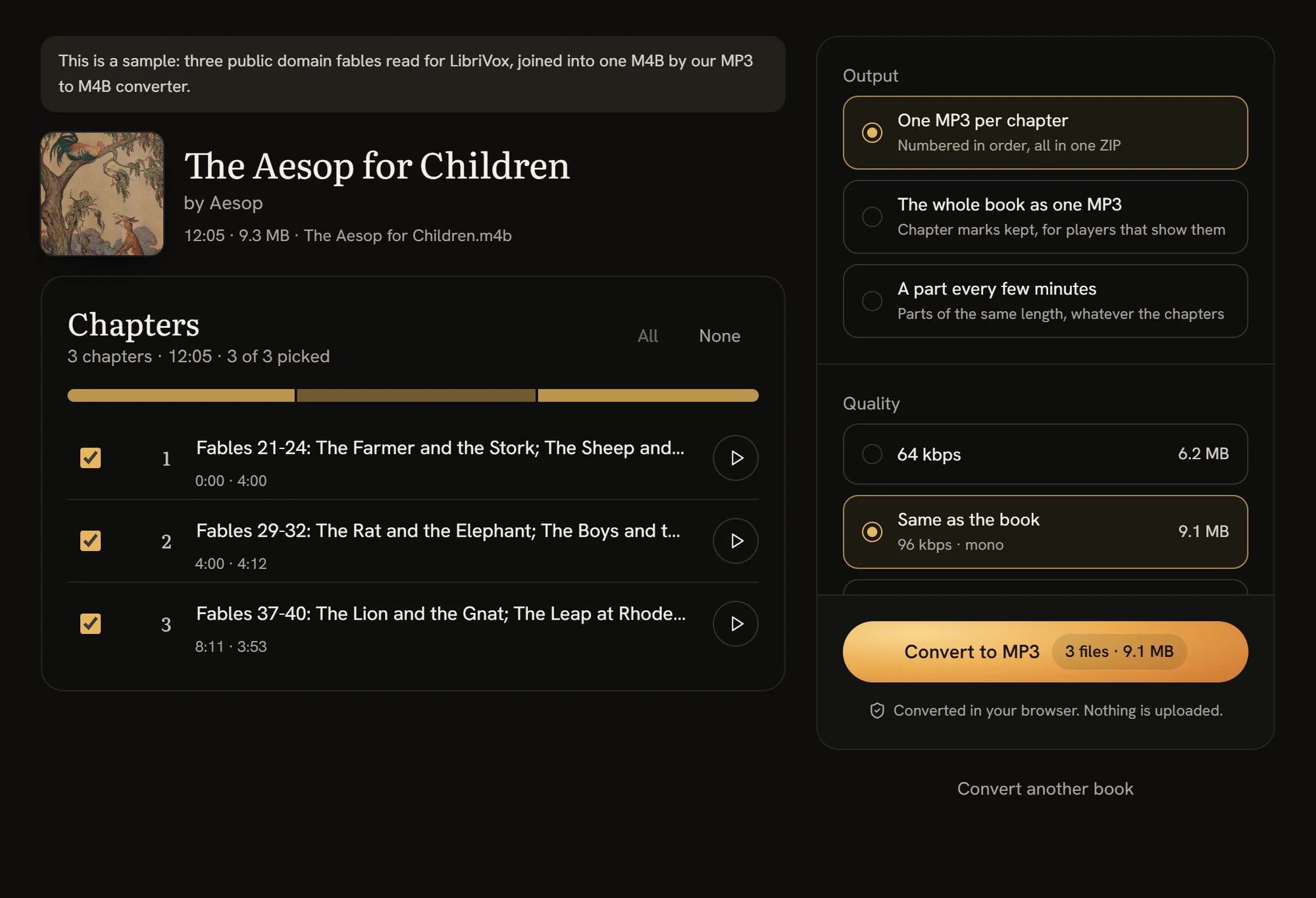 Our converter reading the sample M4B's chapters, before converting it to MP3
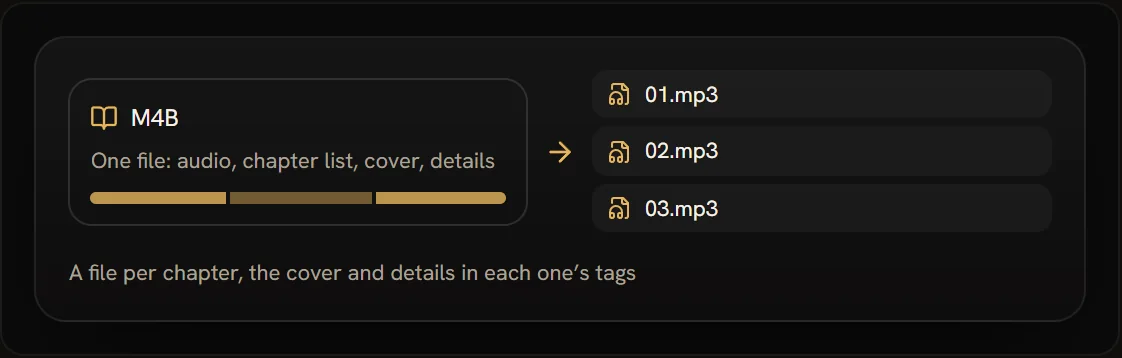 What an M4B becomes as MP3s
MP3 to M4B. Drop the MP3 chapters into our MP3 to M4B converter. They line up by track number or file name, each becomes a chapter, and the book gets its cover, its details and even volume across chapters.
Anything else. Our audiobook converter also takes M4A, FLAC, WAV, OGG and Opus files, and joins several M4B files into one book, keeping every book's chapters.
Make an M4B from a book you have as text
If the book has no recording yet, our audiobook maker has an AI narrator read it from a PDF, EPUB or text, chapter by chapter, and you download it as an M4B with chapters and a cover, or as MP3s. AI narration uses credits, one for every 1,000 characters, and packs start at $9.99.
FAQ
Is M4B better than MP3?
For listening to an audiobook in an app, yes: one file, named chapters and a saved place. For car stereos and simple players, MP3 is the safer choice, because almost everything plays it.
Can VLC play M4B files?
Yes. VLC plays MPEG-4 files with AAC audio, which is what an M4B is, on Windows, Mac and Linux and in its Android and iPhone apps. VideoLAN's own notes say MPEG-4 files holding an audiobook have the .m4b extension, and when the file has chapters, Playback > Chapter lists them.
Can I change an M4B to MP3 by renaming it?
No. Renaming changes only the name; the audio inside is still AAC, and players that need MP3 won't play it. Convert it instead. Renaming .m4b to .m4a does work, because those two are the same format.
Are M4B files protected with DRM?
Not by themselves: an M4B made from your own files, from LibriVox or by our converter is not encrypted. Audiobooks bought from stores are usually in protected formats that play only in the store's app, and those can't be converted with our tools.
Why don't I see chapters in my M4B?
Either the file has no chapters, or your player doesn't read the form it has. Try an audiobook player, or open the file in our M4B to MP3 converter, which lists any chapters it finds.
How big is an M4B file?
About 29 MB an hour at 64 kbps, 44 MB at 96 kbps and 58 MB at 128 kbps, plus the cover. A 10 hour book at 64 kbps is under 300 MB.
Open, convert or make an M4B with VoiceBookify
Convert MP3 to M4B or M4B to MP3, or use the audiobook converter for other formats and for joining books; all three are free and run in your browser. To turn a book you have as text into an M4B, use the audiobook maker.