Immersion Reading: What It Is and How to Try It
Immersion reading is reading a book while you hear it narrated, each word lighting up as it is read. What research says and how to try it on Kindle or any text.
VoiceBookify8 min read

On this page
Immersion reading is reading a book with your eyes while you hear the same words narrated, with each word or sentence lighting up as it's spoken. Amazon gave the practice its name in 2012 for reading a Kindle book alongside its Audible audiobook, but you can do it with any text and any voice that highlights as it reads.
The narrator sets the pace, and that turns out to matter. We measured the AI narration on our own sample books: our five English narrators read at 137 to 191 words a minute, and the two Chinese narrators at 231 and 239 characters a minute. At that pace your eyes can stay with the highlight without rushing. Below is what the research says about reading and listening at once, and how to try it on Kindle, Audible or any text.
What immersion reading is
Immersion reading has three parts: a written text, a narration of exactly that text, and something that shows you where the voice is, usually a highlight that moves word by word or sentence by sentence. You read along instead of only listening.
Amazon introduced Immersion Reading in September 2012, on the Kindle Fire and Kindle Fire HD, describing it as text being "highlighted while it is professionally narrated via the Audible audiobook" (Amazon's announcement). Since February 2026 the Audible app has it too, as Read & Listen (Audible's announcement).
It isn't the same as Microsoft's Immersive Reader, a reading tool built into Word, OneNote, Edge and other Microsoft apps that can read text aloud and change how it looks (Microsoft's page). The names are close; the idea of following a voice through a text is shared.
| Way | What you need | Voice | Highlight |
|---|---|---|---|
| Kindle app with Audible | The Kindle ebook and the Audible audiobook | A human narrator | Word by word |
| Fire tablet | The same | A human narrator | Word by word |
| Audible app, Read & Listen | The audiobook, where the title supports it | A human narrator | As you listen |
| Kindle app, Assistive Reader | The Kindle ebook | Your device's voice | Word by word |
| A read-aloud web reader | Any text, EPUB, PDF or Word file | Browser voices or AI narrators | Sentence or word |
Does immersion reading help? What the research says
The honest answer: it helps some readers in some ways, and the effect is smaller than many articles claim. Four studies we read in full or in their published abstracts:
- Readers with reading difficulties. A 2018 meta-analysis of 22 studies in the Journal of Learning Disabilities found that text to speech and read-aloud tools improved reading comprehension for students with reading disabilities, with an effect size of d = 0.35, or 0.24 after correcting for publication bias. Synthetic and human voices worked equally well (Wood and colleagues, 2018).
- Readers in general. A 2023 meta-analysis of 30 studies and 1,945 readers found reading while listening only slightly better than reading alone overall (g = 0.18). The benefit appeared when the audio set the pace (g = 0.41) and disappeared when readers controlled the pace themselves (g = 0.06) (Clinton-Lisell, 2023).
- Language learners, comprehension. A 2025 registered report with 86 Chinese learners of English found comprehension was lower when they read while listening than when they read silently, though both beat listening alone (Hui and Godfroid, Language Learning, doi:10.1111/lang.12721).
- Language learners, vocabulary. A 2008 study found learners picked up new words in reading, reading while listening and listening, but most words weren't learned in any mode, and few were remembered three months later (Brown, Waring and Donkaewbua, 2008).
Put together: following a narrator can help you stay with a text and helps many readers who struggle with decoding, and it works best when the voice keeps the pace. It isn't a shortcut to faster reading, and for advanced language learners, silent reading may still be better for detailed comprehension.
How to do immersion reading on Kindle and Audible
You need both the Kindle ebook and the Audible audiobook of the same book, bought or borrowed. When a book has both, Amazon offers the audiobook at a discount to people who already own the ebook.
In the Kindle app (iPhone, iPad, Android, Mac):
- Open the book. When you also own the audiobook, the app offers the narration: download it and tap play.
- The narration starts where you are in the text.
- To turn word highlighting on or off, tap Aa, open More and use Real-time Text Highlighting, which highlights words while either Assistive Reader or Audible narrates (Amazon's settings page).
On a Fire tablet (Fire OS 7 or later): open the book in the Kindle app, tap the page, tap the download icon to get the narration, then tap play. The same Real-time Text Highlighting switch is under Aa > More (Amazon's Fire page).
In the Audible app: titles that support it offer Read & Listen. It started in the US in February 2026 and reached Canada, India, France, Italy, Spain, Japan and Brazil in October 2026 (Audible's announcement).
On a Kindle e-reader: you can switch between reading and listening with Bluetooth headphones (Amazon's page), but Amazon doesn't describe word highlighting during the narration there.
Without the audiobook, the Kindle app's Assistive Reader gives the same read-along effect with your device's voice. Our guide to whether Kindle can read to you covers it on every device.
How to do immersion reading with any text or ebook
Many of the things you'd like to read along with have no audiobook: an article, your own draft, a PDF for work, a public domain EPUB. A read-aloud reader that highlights as it speaks turns any of them into immersion reading.
On VoiceBookify, the text to speech reader does this in the browser:
- Paste text, or open an EPUB, PDF or Word file. The file is read in your browser and isn't uploaded.
- Choose a voice. Your browser's own voices are free and highlight each sentence as it's read.
- For a more natural voice, pick one of our 40 AI narrators in 9 languages. They read on credits and light up every word as it's spoken.
- Set the speed. AI voices run from 0.5x to 3x with their pitch kept.
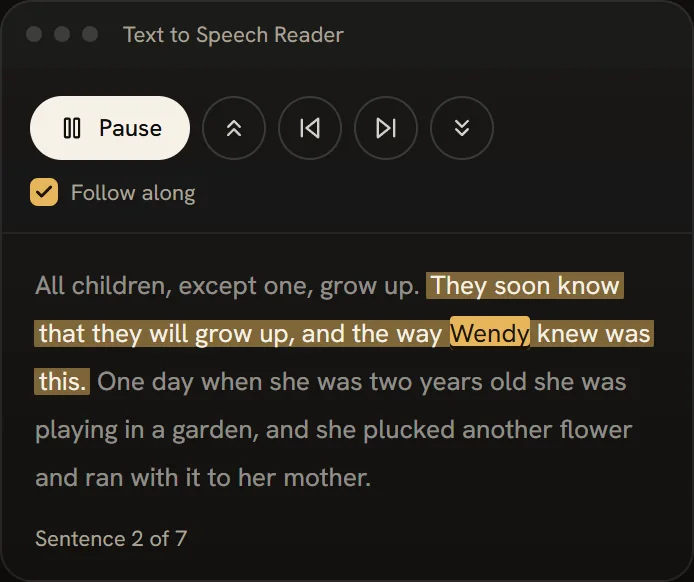 Follow along: the sentence being read lights up, and the word being spoken stands out
If letters crowd or lines blur together, the dyslexia reader adds reading-friendly fonts, wider spacing and a band that keeps your eyes on the current line, and remembers your settings on that device.
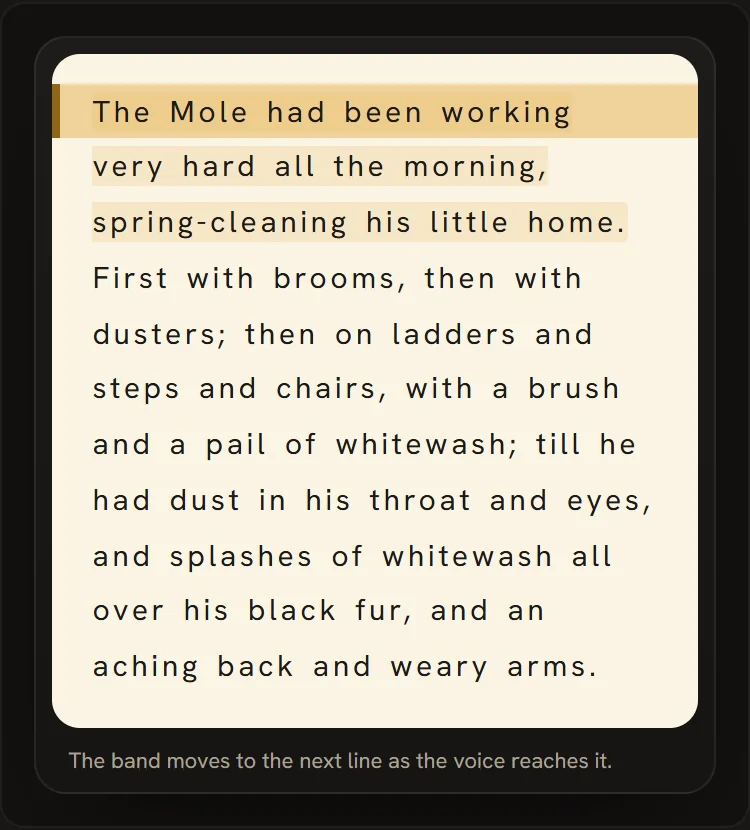 The line band: the current line stays clear while the rest of the page steps back
Who immersion reading suits
- Readers who find decoding hard, including many with dyslexia. This is where the research is most encouraging: hearing the words while seeing them helps comprehension.
- People whose attention drifts in silent reading. A voice that keeps moving gives you a pace to follow, and that pacing is where the 2023 meta-analysis found the benefit.
- Language learners who want to link spelling and sound. Use it for pronunciation and fluency; for close comprehension of hard texts, also read silently.
- Anyone tackling a long or dense book who wants to keep going on a tired evening.
Tips for immersion reading
- Start at 1x and raise the speed slowly. If you keep losing the highlight, slow down; if your mind wanders, speed up a little.
- Keep your eyes on the highlight, not a line ahead. That's what keeps the two channels together.
- Replay a sentence when you lose the thread. In our reader you can click any sentence to start from it.
- Read in shorter sessions of 20 to 30 minutes when you're starting out.
- Pick a voice you like listening to. You'll hear it for hours; try a few samples first.
FAQ
What is immersion reading?
Reading a text while hearing it narrated, with the words highlighted as they're spoken. Amazon uses the name for reading a Kindle book with its Audible audiobook.
Is immersion reading free?
On Kindle and Audible you need the ebook and the audiobook. In a read-aloud web reader, reading with your browser's own voices is free; AI narrators use credits.
Can you do immersion reading on a Kindle Paperwhite?
You can switch between reading and listening with Bluetooth headphones, but Amazon only describes highlighted read-along in the Kindle app, on Fire tablets and in the Audible app.
Is there an immersion reading app?
The Kindle app and the Audible app both offer it for books you own in both formats. For any other text, a web reader that highlights as it reads works on phones and computers without installing anything.
Where can I find audiobooks with text?
Books with both a Kindle edition and an Audible audiobook support it on Amazon. Public domain books from free libraries can be read along in a read-aloud reader, since you have the text and the reader supplies the voice.
Is immersion reading the same as Microsoft Immersive Reader?
No. Immersive Reader is a Microsoft tool for reading text with adjustable spacing, colours and read-aloud. Immersion reading is the practice of reading along with a narration.
Try immersion reading with VoiceBookify
Open any text, EPUB or PDF in the text to speech reader and press play: free browser voices highlight each sentence, and our AI narrators highlight every word on credits. For a whole ebook, the book reader aloud starts at chapter one and remembers where you stopped.
Tools in this article
- Text to Speech ReaderHear text and documents one highlighted sentence at a time, with free browser voices or AI narrators.
- Dyslexia ReaderText laid out the way many dyslexic readers find easier, then read aloud with a band that follows the line.
- Book Reader AloudOpen an EPUB and hear it from chapter one, with a sleep timer and your place kept for tomorrow.